
What is Google Business Home, and why does it matter?
For more than a decade, running a business on Google has felt like managing four independent software companies that barely talk to one another.
A local retailer or multi-channel brand had to jump between business.google.com to update holiday opening hours and reply to reviews, merchants.google.com to monitor product feed disapprovals, ads.google.com to allocate ad spend across Performance Max and Search, and studio.youtube.com to upload promotional videos. Disconnected logins led to practical errors: Google Ads happily continued spending money on Shopping campaigns for SKUs that physical store managers had already marked as out of stock on local shelves.
Google Business Home represents Google's first systemic attempt to eliminate these data silos. It does not replace the deep functionality of native tool consoles. Instead, it places an intelligent control layer over your entire Google operational presence.
The feature is currently in a closed beta rollout across select accounts in the United States and the United Kingdom. Access is limited to verified Google Business Profile accounts managing fewer than 10 locations for a single business entity, with links capped at one Google Ads account, one Merchant Center instance, and one YouTube channel.
The 4 pillars of the unified ecosystem
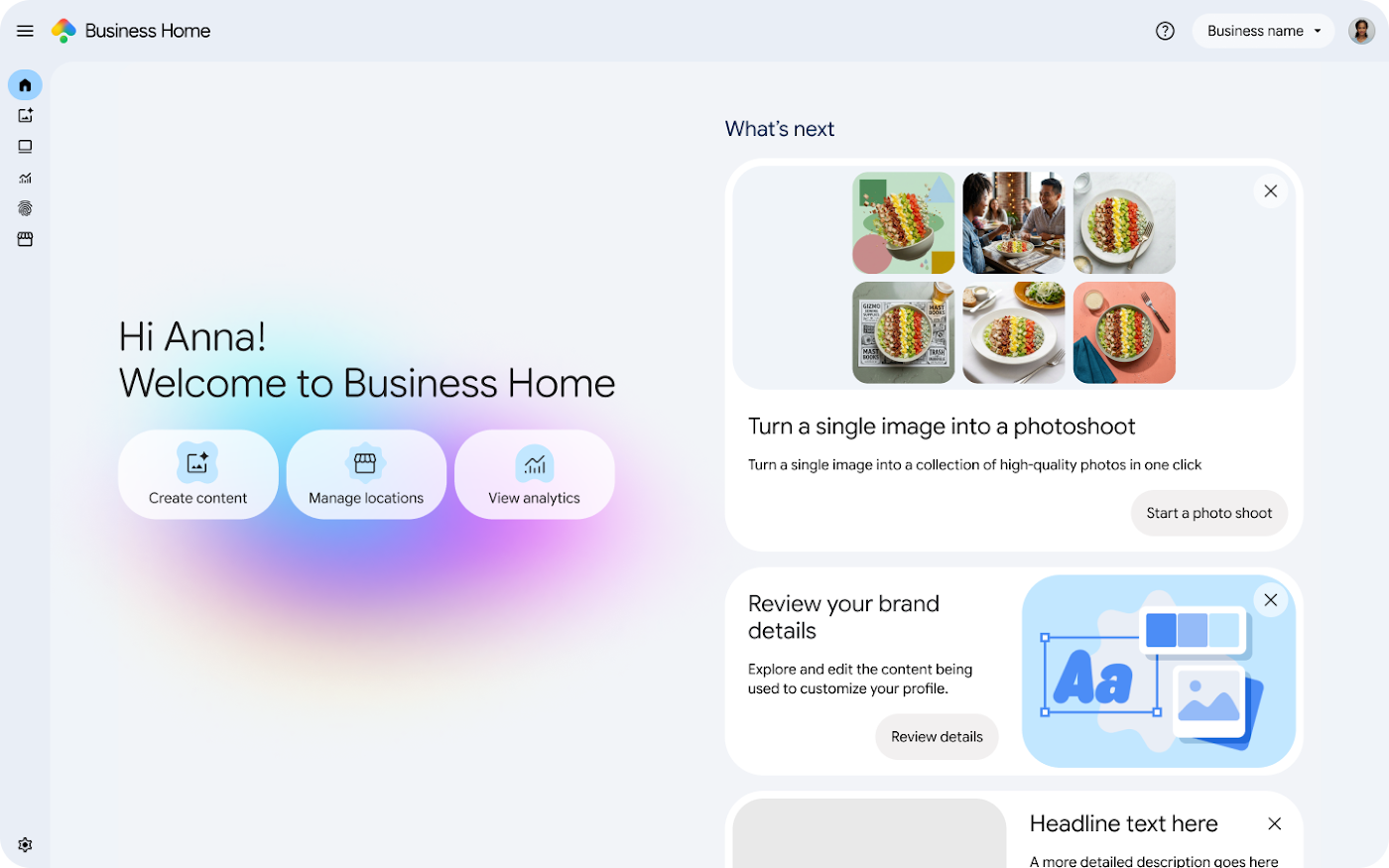
Understanding how Google Business Home fits into your technical stack requires looking at how its four integrated modules share telemetric signals.
Google Business Profile
Google Merchant Center
Google Ads
YouTube Integration
Inside the Gemini-powered Advisor and Creative Lab
The technical centerpiece of Google Business Home is its AI Advisor, engineered on Google's Gemini foundational models.
Unlike traditional Google Ads recommendation cards that mechanically tell you to "raise your daily budget by 20%" or "apply broad match keywords", the Business Home Advisor evaluates cross-tool context.
For example, if your Google Business Profile receives three customer reviews praising your newly arrived summer collection, while Google Merchant Center shows that those specific SKUs have active in-stock feeds with zero active ad coverage, the Advisor highlights the opportunity. It proposes a targeted promotion campaign tied specifically to that inventory.
Accompanying the Advisor is the Creative Lab and Brand Kit module. In traditional accounts, asset creation is fragmented: local profile posts use informal smartphone photos, while Google Ads assets rely on polished studio banners. The Brand Kit allows brands to upload hex color palettes, official brand tone rules, fonts, and core value propositions once. Gemini then drafts localized updates, seasonal review reply templates, and ad copy variants that adhere to your unified brand identity.
RCS messaging and the shift to conversational commerce
Another significant capability embedded into Google Business Home is native support for RCS for Business (Rich Communication Services).
Historically, mobile searchers finding a store on Google Maps either had to tap "Call" or click through to a landing page to fill out an inquiry form. Both paths introduce friction. Phone calls go unanswered during busy retail hours, while static web forms carry average bounce rates exceeding 60% on mobile devices.
RCS replaces basic SMS with verified, interactive chat sessions directly inside Google Search and Maps:
- Verified business badges assure high-intent shoppers that the conversation is authentic and secure.
- Interactive carousel cards let customers confirm if a specific product size or color is physically in stock before traveling to your store.
- Automated triage powered by Gemini answers standard questions regarding parking, pickup windows, or return policies instantly, escalating complex queries to staff.
- Seamless appointment booking eliminates the back-and-forth email scheduling that costs service businesses qualified leads.
Strategic implications: Growth opportunities vs traps
Whenever Google simplifies an interface, growth leaders must ask a fundamental question: who benefits most from the simplification?
Simplified interfaces make onboarding effortless for non-technical business owners, but they often hide the surgical controls necessary to maximize commercial efficiency.
The Opportunity: Seamless omnichannel data synchronization
For growing retail brands operating 1 to 9 physical stores alongside an e-commerce website, having inventory, reviews, and ad performance visible in one tab is a major operational upgrade. Merchant Center feed errors that silently tank Google Shopping campaigns are surfaced immediately next to your store foot-traffic trends.
The Risk: The "One-Click Boost" budget trap
Business Home makes launching promotional ad campaigns as simple as tapping a button. However, simplified campaign creation skips essential guardrails: negative brand keyword lists, search partner exclusions, and margin-filtered feed segmentation. In our audits of retail accounts, launching unconstrained automated campaigns through simplified interfaces consistently drives 25% to 40% of ad spend into broad display placements and low-intent search terms.
Our recommended operating framework is straightforward: adopt Google Business Home for unified operations, review management, Brand Kit asset alignment, and RCS customer messaging. But maintain dedicated, professional engineering inside the native Google Ads console to manage bidding thresholds, Target ROAS constraints, and Performance Max Channel Prioritization.
Frequently asked questions
Who is currently eligible for the closed Google Business Home beta?
The beta is currently invite-only for verified business owners based in the United States and the United Kingdom. Eligible accounts must operate fewer than 10 physical locations for a single business entity, with links limited to one Google Ads account, one Merchant Center account, and one YouTube channel.
Does Google Business Home replace Google Ads Manager or Merchant Center Next?
No. Business Home functions as an overlay dashboard rather than a full replacement for dedicated tool consoles. While high-level metrics, review workflows, and quick generative creatives live in Business Home, deep campaign architectures, bidding scripts, and custom label feed rules still require access to native Google Ads and Merchant Center consoles.
What is RCS for Business inside Google Business Home?
Rich Communication Services (RCS) is an upgraded business messaging standard replacing traditional SMS. Inside Business Home, RCS enables verified interactive messaging directly from Google Maps and Search listings, allowing buyers to verify real-time inventory, ask pre-purchase questions, and book appointments without filling out static website contact forms.
Should retail brands accept automated AI recommendations from the Business Home Advisor?
Operational recommendations (such as resolving Merchant Center product disapproval warnings or replying to unanswered customer reviews) are valuable. In contrast, promotional recommendations (such as one-click budget increases or broad auto-expansion) should be evaluated carefully by a senior media lead to prevent budget waste on low-intent search queries.